Negatives

d

One Glacier, 200 Pieces: Making a Tiled Cyanotype

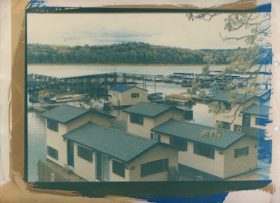
How do you make a cyanotype that is over 2 metres wide? Elizabeth Bourne broke her photograph of the Eqi Glacier into 200 individual sections, creating a tiled paper negative. She carefully numbered, printed, exposed, and assembled each piece to create one huge cyanotype measuring 209 × 109 cm. Using seal blubber oil, glacial runoff, and the Arctic midnight sun, she also found a way to connect the materials and landscape … Read more

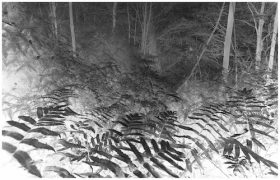
Example of negative

Digital negatives and positives: Film, printers and tools – all the links you need

What is the best tool for digital negatives? Digital negatives make it possible to print photographs taken with a camera or our phone for alternative photographic processes. It is something a lot of artists struggle with. Luckily, several helpful people have come up with systems they share or sell to solve the issue. Which one is best? Hard to say, it depends on your preferences, but what I can do … Read more

Illustration 3. Logarithmically inverted negative

Solving the Digital Negative Problem

Advanced negatives: According to John Riches, developer of TruNeg, creating an accurate digital negative is more complex than simply inverting an image in editing software. Standard photo programs invert pixel values arithmetically, but this does not replicate how a true photographic negative responds to light. As a result, inverted negatives often produce weak shadows, uneven midtones, and excessive highlight contrast. John shares his thoughts. Writer and photography / John Riches … Read more

Exposure time calculator using a stouffer step wedge

Exposure Time Calculator for Alternative Processes using a Stouffer Step Wedge

Constanza Isaza Martínez introduces the Lux Darkroom Exposure Time & Exposure Scale Calculator, a visual tool designed to simplify the often intimidating task of determining correct exposure times when working with alternative photographic processes. The calculator allows artists to identify maximum density directly on a digital step-wedge image and automatically calculates the optimal exposure time. Suitable for negative processes such as cyanotype, platinum and salt printing, positive processes like carbon … Read more

To change an image in Lightroom, choose Develop and then crop to size it

Making Negatives in Lightroom Classic – Step by Step

Step-by-step guide to making negatives in Lightroom. When printing alternative photographic processes, the image is typically created either as a photogram (using physical objects) or from a negative (a film) derived from a digital photograph – perhaps taken with your phone. There are many software options available for producing a negative. Kai Tormod Hansen demonstrates how to create both positive and negative digital films using Lightroom Classic for use in … Read more

Final tricolour cyanotype

Tri-Color Cyanotypes: Advancing the Techniques from Duotone

Building on the foundation of duotone cyanotype, Matthew Bary guides us through the next step – creating tri-colour cyanotypes, including a detailed step-by-step for preparing negatives. Drawing from earlier failed experiments. With emphasis on image selection, precision, and patience, this method reveals how vibrant, multi-layered cyanotypes can be achieved using simple materials and creative problem-solving. Writer and photography / Matthew Bary   My “duo tone” tests and instructions ultimately came … Read more

Dry the negatives

Duotone cyanotypes #4 – Print the negatives

Part 4 in Matthew Bary’s series on duotone cyanotype provides instructions for printing negatives using various Canon printers and transparency film. It includes details on printer settings, ink choices, and the printing process for both cyan and magenta + yellow negatives. Writer and photography / Matthew Bary Read the SDS (Safety Data Sheet) before attempting to use chemicals and use the correct safety equipment. Once you have created a negative Duotone … Read more

Brighness negative

Duotone cyanotypes #3 – Make negatives using GIMP

Part 3 in Matthew Bary’s series Duotone cyanotype is a detailed guide for creating cyanotype negatives using Gimp software. It covers steps for flipping images, adjusting colors, adding registration marks, separating images into color components, applying curves, and exporting negatives for cyanotype printing. Writer and photography / Matthew Bary Read the SDS (Safety Data Sheet) before attempting to use chemicals and use the correct safety equipment. Lets start with a … Read more

The True Inverted Digital Negative Figure 7

The True Inverted Digital Negative

John Riches at TruNeg has a method using mathematics to fix the failure of the inverted image to make a workable negative. If nothing else, a great lesson in how digital negative works. Writer and photography / John Riches at TruNeg Disclaimer: Please note this product is for sale. We do not get any kickback from this article, and we have not tested the spreadsheet. The article contains enough information … Read more

Two prints with different results

Spikes in development – Problem and Solution

Removing the spikes in development is important, in order to work with better data and get more precise correction curves for the best linearization of our photographs. Paolo Saccheri has tested this below on cyanotypes, though it is the same on other alternative processes. Writer and photography / Paolo Saccheri What are spikes? Spikes are sudden bumps in values, reading a step tablet test print used to calibrate a printing … Read more

The printer settings I use at the moment within Photoshop

Digital negative printer settings

Paolo Saccheri shares settings used for making digital negatives and highlights the difference the software can make. Writer and graphics / Paolo Saccheri What printer settings should be used for creating digital negatives? Many print makers ask what are the correct printer settings to use to print their digital negatives. The real answer is that there is no fixed true answer. It all depends on your process, i.e. the sum … Read more

Scott Wittenburg proofing negatives.

Making large format negatives with X-ray film

Scott Wittenburg shares his experience of working with large format x-ray film photography and how he uses them as an inexpensive and fun way to create large-format negatives. Writer and photography / Scott Wittenburg Read the SDS (Safety Data Sheet) before attempting to use chemicals and use the correct safety equipment. I began my X-ray film experience after building a homemade 11×14 view camera from scratch several years ago. Having … Read more

Figure 13: Assembly Pins into the paper Registration Strips

Gum print registration

Instructions to register gum prints. Gum bichromate printing requires multiple pass to get the right density both for black and white and color prints. Here is how. Writer and photography / Andrea Baldi Read the SDS (Safety Data Sheet) before attempting to use chemicals and use the correct safety equipment. A reliable registration system is helpful to get multiple layers of the gum prints that do not show any misalignment … Read more

F-SAP Table f-stop exposure times 1.33

F-SAP 1.33 Table f-stop exposure times

Writer and photography / Gerard Smeets Gerard Smeets shares with us a table with f-stop related exposure times between 1 and 64 minutes plus the manual for this table. The table is also available to download. Finding the standard exposure time In many manuals of alternative processes, there is a text like this: ‘make a test strip with 8 times at an interval of 4 minutes, starting with 4 minutes’. … Read more

Registering a negative for the gum bicromate process step 4

A simple negative registration method 

A simple, but effective OHP negative registration technique for gum printing. The method can be used for multiple pass single negative prints as well as CMYK negative prints.

Grey gamma on digital negatives 6b

When to use gray gamma 1.8 or 2.2 for digital negatives

Regardless of the workflow you use to make digital negatives, consistency is the key to achieving repeatable results. It’s worth questioning whether or not the original step wedge was made in gray gamma 1.8 or gray gamma 2.2.

Digital negatives

A three step method for making digital negatives by Ron Reeder and Christina Z. Anderson, an excerpt from Gum Printing and Other Amazing Contact Printing Processes.